
Payment approvals for South African businesses
Every payment approved, traceable and ready for the bank.
EzeFlow replaces approvals on email and WhatsApp. Staff submit a request with the invoice attached or file a slip from their phone, the right people approve it, new suppliers are checked by two people, and your bank team exports a checked FNB payment file. Every step is logged for your auditor.
Or try the live demo with a sample company.
- No credit card needed
- Android app included
- Hosted in South Africa

In daily use at MCM across several branches and currencies.
- Several organizations
- Any currency
- FNB bulk payments
- Android app
- AI assistant
Product tour · 3:58
See a payment and a fuel slip go from request to bank.
A payment request with its quotation, purchase order and invoice, a new supplier checked by two people, approvals and the FNB batch, a fuel slip and its card slip photographed in the Android app, the reports, and Ask Max. A demo company with made-up data.
Why teams switch
Approvals in inboxes break quietly, until audit time.
No proof of who approved
A thumbs-up on WhatsApp is not an approval your auditor can rely on. Emails get deleted, screenshots get lost.
Each approval is signed in, timestamped and kept with the request.
Nobody knows whose turn it is
A small supplier payment waits days because the approver was only copied in, or the invoice was in another thread.
Everyone sees what is waiting for them, and the bell shows new notes and tags.
Bank details you cannot trust
Supplier bank details arrive by email and get typed into the bank. One changed account number is all a fraudster needs.
Approved suppliers only, two people check every new supplier and bank-detail change, and batches warn when details change.
How it works
One flow from request to bank.
The same five steps for every payment, in every organization.
-
01
Request
Staff submit on the web or the Android app: the supplier from the approved list, the invoice, quote or slip photo in its window.
-
02
Approve
The number of approvers you set must sign off, never the person who asked. A rejection goes back with the reason.
-
03
Query
Reviewers ask on the request, the requester answers there, colleagues are @tagged.
-
04
Pay
The bank team builds a checked FNB batch of approved payments to authorised suppliers. FNB authorisers release it.
-
05
Report
Reports, search, Ask Max and the audit log show who did what, when, in which organization.
Features
Everything between the invoice and the bank.
Approvals & audit trail
Set how many people must approve. Every step is signed in, timestamped and logged.
Learn moreFNB bank payments
Supplier master file, checks against your FNB beneficiary list and a ready-to-import FNB CSV.
Learn moreSupplier control
Requests only pay approved suppliers. Two people check every new supplier and every bank-detail change.
Learn moreCard & fuel slips
A photo of the slip, the card's last 4 digits, the vehicle and its kilometres. Card and vehicle reports.
Learn moreNotes, @tags & alerts
Reviewer and requester notes, @tag a colleague, and a notification bell instead of WhatsApp.
Learn moreOrganizations & roles
Each user sees only their own organizations. Built-in and custom roles with 24 permissions.
Learn moreDocuments & smart search
Documents sorted and renamed automatically. Search in plain words, English or Afrikaans.
Learn moreReports & exports
Turnaround, red flags, vehicles, cards and suppliers. Totals per currency. CSV, PDF and Excel.
Learn moreAsk Max (AI assistant)
What is waiting, what was paid, who approved it. Max answers from your own data and writes PDF summaries.
Learn moreFNB bank payments
Approved payments become a checked FNB payment file.
Your bank team selects approved payments, EzeFlow checks every line against your supplier master file and your latest FNB beneficiary list, and you download a file ready to import into FNB Online Banking Enterprise. FNB stays the final control: your authorisers still release the payments there.
- Requests only pay approved suppliers, picked from a list: nobody types an account number
- Two people authorise every new supplier and every bank-detail change, against the bank letter
- Upload your FNB beneficiary export and see which suppliers are missing or different
- Checks before you finalise: changed bank details, duplicates, unusual amounts, edits after approval
- One batch per organization, plus a list of payments to capture by hand
Card & fuel slips
The slip is filed at the pump, not found in a cubbyhole at month-end.
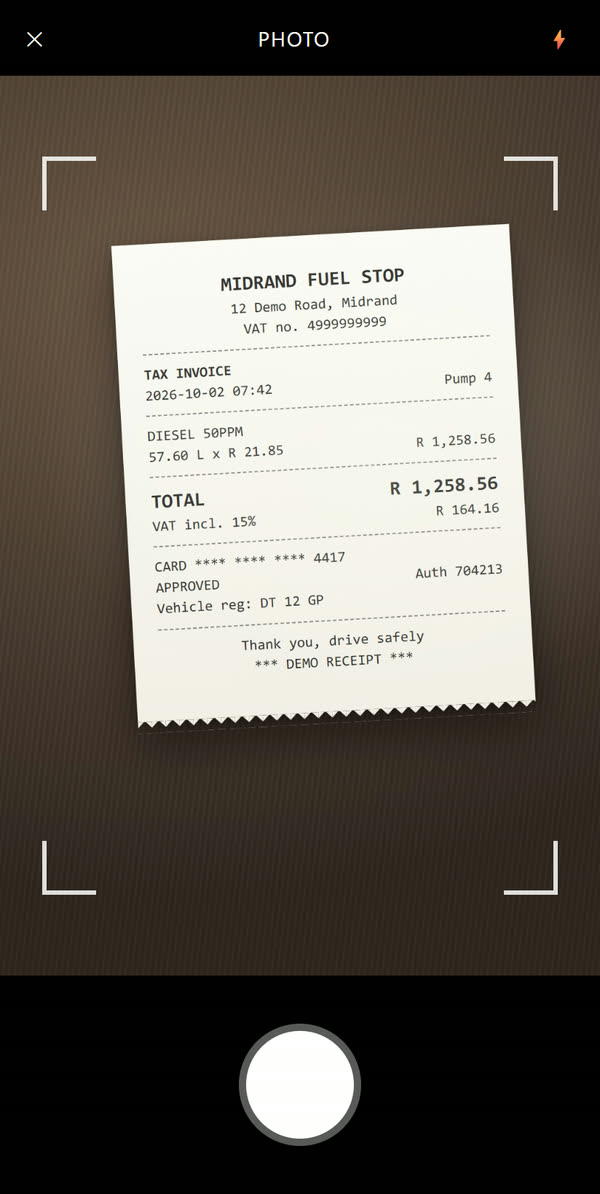
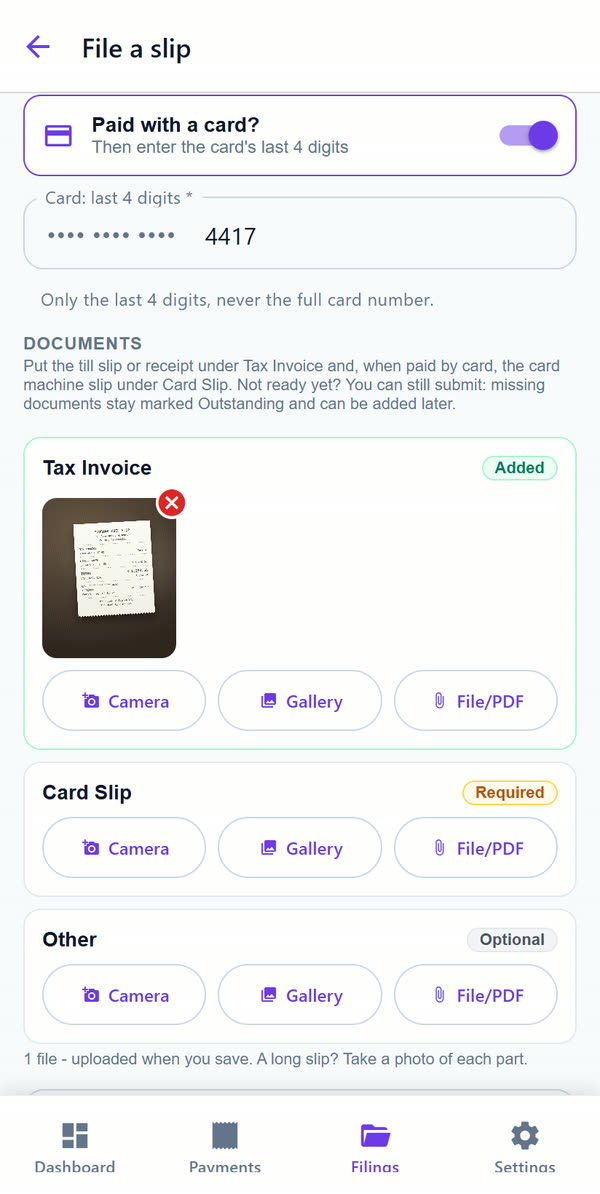
In the Android app a slip takes a minute: a photo of the slip, the amount, the card it was paid with and, for fuel, the vehicle and its kilometre reading. Finance approves it like any payment, and the reports show the cost per vehicle and per company card.
- A photo of the slip, right in the app, in its own window
- Vehicle registration and kilometres on every fuel slip, and a vehicle report
- Card slips with the card's last 4 digits, and a card slip report
- No signal? The slip waits in the outbox and goes once the phone is online
Each branch sees its own. Head office sees it all.
Put branches, divisions or sister companies in one account. Users only see the organizations they are assigned to, in lists, reports, search and exports. Build your own roles from 24 permissions.
Organizations & rolesFind any payment in plain words.
Type what you mean: "approved but not paid", "Apex invoices September" or "kwitansies Kaapstad". Smart search understands statuses, dates, people and organizations, and totals stay per currency.
Documents & smart search
Ask Max, your payments assistant.
Ask in plain English or Afrikaans: what is waiting, what was paid, who approved it. Max answers from your own data, links to the records and writes PDF summaries. It only reads what you may see.
Ask Max (AI assistant)Two-factor sign-in
An emailed code or a free authenticator app, with recovery codes. Required for finance and admin if you choose.
Two-person supplier checks
New suppliers and bank-detail changes need two people. Account numbers are stored encrypted and shown masked.
Audit log
Sign-ins, approvals, edits and exports, searchable and exportable. Nobody approves their own payment.
Hosted in South Africa
Your data stays in the country, and you can export it at any time.
Industries
Made for businesses with branches, sites and people on the road.
Automotive & dealerships
Parts orders, supplier settlements, imports and stock deposits across branches.
Construction & engineering
Site purchases, subcontractors and equipment hire, captured on site and approved at head office.
Healthcare groups
Several practices, locums and medical stock, each practice kept separate.
Multi-branch retail
Store purchases and supplier payments with one clean month-end for group finance.
Agriculture & logistics
Fuel, depot purchases and field call-outs submitted from the road.
“At MCM, EzeFlow streamlines the entire payment lifecycle — from request to authorization to release — ensuring every transaction is processed above board, fully traceable, and policy-aligned. The platform delivers two critical outcomes for a company operating at scale: control and security. For an organisation like ours, where supplier payments, imports, parts procurement, and operational expenses must be tightly managed, EzeFlow has become an integral component of our internal control environment.”
Johannes van Niekerk
Director, MCM
Pricing
Simple plans in rand.
Start free, or try any paid plan for 7 days without a card. Pay yearly and get two months free.
Starter
For small teams replacing email approvals
R499 /month
about $27 per month
- 5 users
- 100 requests a month
- 1 GB storage
Professional
Bank payments, reports and custom roles
R999 /month
about $54 per month
- 20 users
- 500 requests a month
- 5 GB storage
Enterprise
Unlimited, with API access and priority support
R2 499 /month
about $135 per month
- Unlimited users
- Unlimited requests
- Unlimited storage
What is EzeFlow?
EzeFlow is online software for South African businesses that takes a payment from request to approval to bank file. Staff submit a payment request with the invoice attached, or file a card or fuel slip from their phone, the people you choose approve it, questions are answered on the request itself, and approved payments go into a checked FNB bulk payment file. Every step is signed in, timestamped and logged.
How do approvals work?
You choose how many different people must approve a payment (one to ten). Until that number is reached the request shows as "partially approved". Nobody can approve their own request, approvers only approve payments of the organizations they belong to, and a rejected request goes back to the requester with the reason.
How are supplier bank details protected?
A payment request can only pay a supplier on your approved list, picked from a dropdown, so nobody types an account number. Every new supplier and every change of bank details is checked by two people against the proof, never by the person who added it, before it can be paid. Account numbers are stored encrypted.
Does EzeFlow pay my suppliers?
No. EzeFlow never moves money. It builds the FNB Online Banking Enterprise payment file from approved requests, after checking them. Your team imports that file into FNB, and your FNB authorisers release the payments as usual, so the bank stays the final control.
Which banks are supported?
The bulk payment file is built for FNB Online Banking Enterprise. Payments that cannot go into the file are listed separately for manual capture, so you can use EzeFlow with any bank for the approval side.
Can each branch or company see only its own payments?
Yes. A company account can hold several organizations (branches, divisions or separate companies). Each user is assigned to one or more organizations and only sees those payments, reports and search results.
Is there a mobile app?
Yes, an Android app to submit requests, file card and fuel slips with the camera, approve, and ask Max. A slip filed without signal waits in the app and goes for approval as soon as the phone is online again. On an iPhone you can use EzeFlow in the browser.
Is there an AI assistant?
Yes. Ask Max answers questions about your own payments and slips in plain English or Afrikaans, with links to the records, and writes PDF summaries. Max only reads what the person asking may see, and your administrator decides whether to switch it on.
How much does EzeFlow cost?
There is a free plan for small teams. Paid plans are R499, R999 and R2 499 per month, and paying yearly gives you two months free. Every paid plan starts with a 7-day free trial and no credit card.
Where is our data kept?
EzeFlow is hosted in South Africa. Supplier bank account numbers are stored encrypted, sign-in can require a second step, and you can export your data to CSV at any time.
Stop chasing approvals. Start paying with confidence.
Set up your company in a few minutes, or look around a demo company with sample data first.